Connecting Microsoft Business Central to an Azure Data Lake — Part 3
Jesper Theil Hansen · Mar 28, 2025 (Updated Apr 10, 2025) · 4 min read · Business Central
Series: Part 1 — Scheduling of Export and Sync | Part 2 — Avoiding Sync Collisions | Part 3 — Duplicate Records After Deadlock Error | Part 4 — Archiving Data to Speed Up Sync
After having the BC to Data Lake synchronization running well for some months, we hit an issue twice within a short timeframe.
The Business Central implementation receives a lot of documents from external sources (orders, confirmation documents, invoices, etc.) via API endpoints. Even standard Business Central can run into a deadlock when doing multiple postings simultaneously.
Duplicate EntryNo's in Transaction Tables
Transaction tables like GLEntry, CustLedgerEntry, etc. typically have a unique EntryNo field that is controlled by the system — sequential, unique, and marked as AutoIncrement.
According to documentation, these numbers would never be reused. However, the documentation also states:
"A table can only contain one auto-increment field. The numbers assigned to this field will not always be consecutive for the following reasons: If you delete some records from a table, the numbers used for these records are not reused. If several transactions are performed at the same time, they will each be assigned a different number. However, if one of these transactions is rolled back, the number that it was assigned is not reused."
In practice, however, if just one transaction is rolled back and no new numbers have been assigned, the numbers can be rolled back and used for the next transaction. This is what happened — we got duplicate EntryNo's exported as deltas:
- The data lake export at
time=1:00exported a record withEntryNo 25001anddata=X - The next data lake export at
time=2:00exported a record withEntryNo 25001anddata=Y - The transaction involving record X had failed with a deadlock error at
time=0:57and was not posted - The transaction involving record Y had posted fine at
time=1:03
Update April 2 2025: The assumption turned out to be correct. There is a reliable repro that results in duplicate EntryNo's — EntryNo's will be reused. The fix is now in the main BC2ADLS repo: github.com/Bertverbeek4PS/bc2adls/pull/253
Check for Duplicates, and Sync on EntryNo
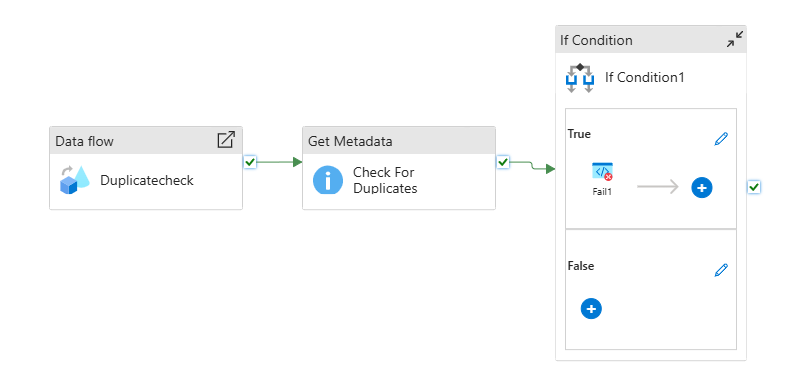
Short-term fix: Added a "check for duplicates" pipeline that runs after the main consolidation pipelines. It runs a dataflow that aggregates all records by EntryNo and outputs any with a count higher than 1 to a CSV file. The pipeline checks for duplicates and fails (triggering an alert) if any are found.
Better long-term solution — Sync on EntryNo instead of SystemID:
The pipelines sync based on SystemID by default. For GLEntry-type tables, it's straightforward to change to sync on EntryNo instead. The Consolidation_flow dataflow was copied to Consolidation_flow_entryno with 4 changes:
In the two output sections where systemId is defined, add EntryNo-1:
{$Company} as string,
{ EntryNo-1 } as long
Change SystemId to EntryNo in these two lines:
CurrentData derive({$UniqueRecordKey} = concat(toString({ EntryNo-1 }), iif($perCompanyEntity, {$Company}, ""))) ~> CurrentDataWithUniqueRecordKey
Deltas derive({$UniqueRecordKey} = concat(toString({ EntryNo-1 }), iif($perCompanyEntity, {$Company}, ""))) ~> DeltasWithUniqueRecordKey
The SyncGroup features from Part 1 are used to choose which entities use the new EntryNo-based flow.
Screenshots