Connecting Microsoft Business Central to an Azure Data Lake — Part 2

Jesper Theil Hansen · Mar 28, 2025 · 3 min read · Business Central
Series: Part 1 — Scheduling of Export and Sync | Part 2 — Avoiding Sync Collisions | Part 3 — Duplicate Records After Deadlock Error | Part 4 — Archiving Data to Speed Up Sync
After going live with the solution and the data lake sync, we ran into a problem that corrupted data in the lake.
Data Export Clashes with Pipeline Sync
We export data from BC every hour at minute :00, so we configured the hourly sync pipelines to run every hour at minute :15 — giving the BC export ample time to finish before the pipeline ran. This worked fine for a while, but at some point we had a case of missing data in the lake.
Factors that caused the issue:
- We had added more and more entities to the 1-hour sync group
- We had a relatively small Spark pool (slower execution)
- Pipelines run in batches; the number per batch depends on your allocation of v-cores
- There was an Azure issue affecting performance
- A pipeline failed completely, possibly due to a temporary Azure outage
Result: The 1-hour pipelines ran for more than 45 minutes. When BC exported data at the top of the hour, some pipelines were still running — and after they finished they deleted all deltas, including the newly exported, not-yet-synced delta files.
Processing Folder and Lock File
Two changes were made to address this:
1. Semaphore-file based lock
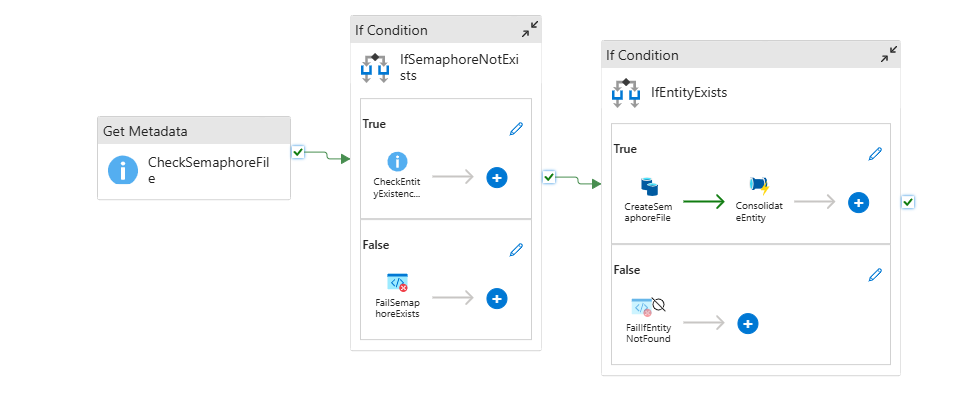
A simple semaphore-file lock on each entity's sync pipeline so a new sync pipeline won't start if another is still running. This change was made in the Consolidation_CheckForDeltas pipeline. If the semaphore file exists, the pipeline exits with a "Fail" result so we get an error in the log.
2. Processing folder
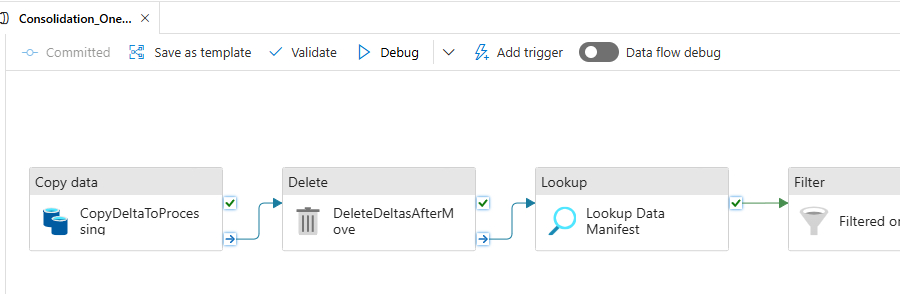
The Consolidation_OneEntity pipeline was changed to start the sync by moving deltas to a /processing folder and then let the sync work by reading from there. This lets a new BC export write to delta without mixing up which files have been processed and which haven't.
The sync sequence for an entity now is:
- Check if semaphore lock is in place — if it is, abandon and fail
- Generate semaphore lock
- Move deltas to processing, and delete deltas folder content
- Perform sync as before but based on deltas in processing folder
- Remove delta files in processing folder
- Remove semaphore lock file (since placed in processing folder, this is automatically removed along with the delta files)
Since making these changes we have not seen any of these sync failures.
Also: the delta-file path is read from the deltas manifest file, so the manifest was updated to point to the processing folder:
"rootLocation":"processing/PaymentTerms-3"
Screenshots